Speaking the language of business intelligence with an Australian accent

Showing posts with label SSAS. Show all posts

Sunday, October 11, 2009

Book Review: Expert Cube Development with Analysis Services 2008

Full disclosure: the authors of this book provided me with a free review copy of this book.

ExpertCubeDevelopmentSSAS2008

As the title suggests Expert Cube Development with Microsoft SQL Server 2008 Analysis Services is not a book for SSAS beginners. This book fills a need that has been out there for a while when it comes to Analysis Services publications: a concentrated volume focused on enhancing the knowledge of the experienced SSAS pro. From the outset the authors assume the reader already has experience with the product, cover a few ground rules and get right down to business.

The amount of real world SSAS implementation experience shared between Alberto, Marco & Chris shines through indicating just how much work they’ve collectively done with Analysis Services. Many technical books have advanced sections or whole chapters dedicated to more advanced development techniques and tips. Being pitched as an expert book enables this level of content to pretty much fill the entire publication.

There is a lot of goodness jammed into the book’s 320-ish pages. You can sense that the authors tried hard to fit as many tips, tricks and techniques into each chapter as possible without bloating the text. They do not waste page space explaining the simple stuff because, if you’re reading this book, you should know the simple stuff. Each chapter remains concise and tells you what you need to know and where to go if you want to find out more by means of links to blog posts, white papers and other books as well as downloadable sample code.

My only criticism is a somewhat superficial one and is probably directed more at the book’s editor than its authors. There were no reference numbers and caption text underneath any of the screenshots, tables and figures at all. The non-textual items seemed naked without them and this made the end product seem a little less polished. As a reader I prefer it when the text points specifically to “Figure 1.2” instead of “the screenshot”. On some occasions the text didn’t even make direct reference to the item that appeared on the page with it, the relationship was implied by proximity.

If you have not worked much with SSAS yet then this is not a book you should be starting with. If, however, you’ve been working with the product and want to ensure you’re squeezing every last bit of performance out of your OLAP databases, this is a book you’ll want to read cover to cover. Even the most seasoned SSAS experts will come across material or techniques they did not know of or had forgotten about.

Friday, December 12, 2008

SSAS 2008 Dynamic Sets in Analytic Reports

The primary aim of PPS SP2 is really platform support, particularly the addition of SQL 2008 as a data source. One of the subtle new features of Analysis Services 2008 is the support for dynamic named sets. Now that we can connect to 2008 cubes we can take advantage of them.

In 2005 we could create named sets but the members they contained were static did not change once the cube had been processed. This is probably why the 2005 AdventureWorks cube doesn't contain any TOP / BOTTOMCOUNT named sets - they were static and not of much use. In 2005 if we want a dynamic TOP n result set we need to write an MDX statement containing a session-scoped WITH SET statement.

WITH
  SET [Top 10 Selling Products] AS
    TopCount
    (
      [Product].[Product].[Product].MEMBERS
     ,10 
     ,[Measures].[Sales Amount]
    )
SELECT
  [Measures].[Sales Amount] ON 0
,[Top 10 Selling Products] ON 1
FROM [Adventure Works]
WHERE
  [Date].[Calendar].[Calendar Year].&[2002];

If we wanted a PPS analytic report displaying TOP / BOTTOM n data from an SSAS 2005 data source we had to plug an MDX statement into the analytic report definition like the one above. Because we had to write manual MDX in order get the desired result the user lost their right-click interactivity in the deployed dashboard.

Enter SSAS 2008 dynamic named sets.  By setting a named set's Type property to Dynamic we now have a set that will recalculate its members based on the context of the query it is referenced in.

SSAS2008DynamicSet

CREATE DYNAMIC SET CurrentCube.[Top 10 Selling Products] AS
    TopCount
    (
      [Product].[Product].[Product].MEMBERS
     ,10
     ,[Measures].[Sales Amount]
    ) ;

Because the named set is an object within the cube we can now build out an analytic report using drag & drop and don't have to touch the MDX to get what we need. As a result users have full access to the right-click menu.

Demo

I set up 3 analytic grid reports using a named set called Top 10 Selling Products and embedded them in a dashboard.

  1. References a Top 10 Selling Products dynamic named set I defined in the AdventureWorksDW2008 cube
  2. Manual MDX implementation of Top 10 Selling Products completely defined in the query tab of the Analytic View Designer (using the MDX code above)
  3. References a Top 10 Selling Products named set that I defined in AdventureWorks for SSAS 2005 (a static named set)

I created a single date filter and hooked each of the grids up to it. As you can see from the shot below. At the All Periods level all three grids show the same 10 products and the same Sales Amount totals. All is well.

AllPeriods

When we filter on a year, say CY2002, we see several things.

  1. The SSAS 2008 grid is noticeably faster and completes rendering first with accurate results
  2. The manual MDX implementation results match those returned by the SSAS 2008 version, as it should, but it was slower.
  3. The members that make up the SSAS 2005 named set do not change. We get gaps for the products that we didn't sell in 2002 - like the Mountain-200... bikes. We must have sold plenty of them in later years as the static set put them at the top of the list for all time sales.

CY2002

Now, let's try interacting with our two accurate grids. As expected the Manual MDX version has no drilldown capabilities. Remember that this limited drill functionality is by design - if you change even one character of the MDX on an Analytical report user interactivity features are disabled.

ManualMDXNoDrill

Now here's the good bit. Because the SSAS 2008 grid was built using drag & drop with no hand-altered MDX we have full right-click access to the data behind it.

SSAS2008Drill

So, if you're using (or about to start using) SSAS 2008 get stuck into Dynamic Named Sets and put them to use in your cubes.

The main advantages:

  • Drag & drop analytic report design = faster, simpler development
  • Enhanced user experience in the dashboard
  • More centralized logic in the cube, less code in the element definitions
  • Faster performance

Thursday, April 26, 2007

Scorecard page filters for "today"

Calendar page filters are a common feature of just about every OLAP-based scorecard I have worked on. As soon as this functionality is implemented users will ask if the scorecard can auto-slice data based on the current day/month/quarter etc. Then, if needed, they can slice by another time period of their choosing.

When creating scorecard page filters BSM Builder gives developers the opportunity to specify a default member. Problem solved? Not really. Both the key and the display name of this default member are saved as part of the scorecard view definition, with time dimensions this won't do us much good at all. For example, the key of today's date may be something like [Calendar].[Day].&[20070426]. Tomorrow this value is useless as a "current day" and must be manually changed again either by the user in WSS or the developer using Builder.

One possible solution is to configure default dimension attribute members in the source cube. This alleviates the need to set a default member in Builder, however there are a few downsides:

  1. the scorecard data does indeed get sliced by the default member but the member name is not displayed in the page filter box, users can't be sure what data they're looking at
  2. if the cube that contains scorecard data is accessed by applications other than BSM default time member/s may cause confusion
  3. you can't set a default member on a hierarchy (Year-Qtr-Month-Day) only the individual attributes that make it up; mostly the time page filter requested for a scorecard will be a hierarchy
A possible solition

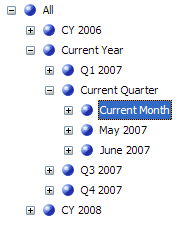
So, if the scorecard view page filter remembers the default member key (and name) as set in Builder then why not pass it the same value all the time? If the current quarter member's key is always [Calendar].[Current Calendar].[Month].&[1] and the corresponding member name is always [Calendar].[Current Calendar].[Month].[Current Month] then BSM will have no problem slicing KPI data by this member every time. All we need to do is ensure that the correct members are assigned the correct key and name depending on the current date. A hierarchy that implements this type of functionality will look something like the picture below. Note that the year 2007, Q2 and April have all been replaced with Current Year, Current Quarter and Current Month respectively. Under the covers the keys that identify these members are also [Calendar].[Year/Quarter/Month].&[1]

We can ensure that the current day/month/year members of an attribute always have the same key by using a view in the data warehouse that references the base calendar dimension table to dynamically calculate these values using GETDATE() as a reference point. To correctly configure each attribute in the dimension the view will need 3 columns (key, name and order) for each "current" attribute we want to create.
  1. ...Key - a numeric key for all values (e.g. 200702 = February 2007) except the calculated current period which will be assigned a 1
  2. ...Name - human-readable name (CY 2007, April etc.) for all members except the current which will be assigned a static value like "Current Month", "Current Year" etc.
  3. ...Order - a numeric key to order the attribute members so that the "Current ..." sits in the right place.

Listing 1 contains the SQL code for creating (and populating) a sample calendar dimension and listing 2 contains the SQL for creating a view off that table and the appropriate sets of 3 fields.

Configuring the Dimension Attributes

When it comes to the time dimension itself it is important to note that I am very definitely not talking about dynamically altering the values of the base dimension key. The dimension key is sacred and does not get touched. All we want to do is add extra attributes that are related to the dimension key via attribute relationships. On top of the regular (Year, Month, Day etc.) attributes we will also have Current Year, Current Month, Current Day etc. attributes thanks to the output of the view. The T-SQL view code determines who gets the key value of 1 and name of "Current..." each day. We can then create separate hierarchies, one containing the regular attributes and one for the current attributes.

When configuring one of the new attributes in BIDS use the ...Name and ...Key fields in the KeyFields and NameFields attribute properties. The trick to getting members ordered correctly (because we have a 1 floating about in the key field) is to:

  1. add the ...Order field as a new dimension attribute
  2. create an attribute relationship on the attribute that will use the value in the ...Order attribute to order its members
  3. in the attribute to be ordered set the OrderBy property to "AttributeKey", and set the OrderByAttribute property to reference the ...Order attribute created in step 1
  4. set the newly created ...Order attribute's AttributeHierarchyEnabled property to "False" - we don't need it for anything other than ordering

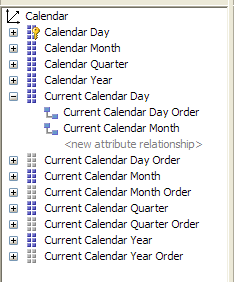
The shot below shows the Current Calendar Day attribute, it has a relationship to the Current Calendar Day Order attribute to enable ordering. Meanwhile the Current Calendar Day Order attribute itself has been disabled, hence greyed out.


Processing

Because we are changing a few values in the time dimension as often as the lowest granularity (normally a day) the calendar dimension needs to be regularly processed. Again, we are not doing anything to the dimension key here, all that is being done is changing the key and name values of some attribute members that are related to the key. A ProcessUpdate will be fine to ensure the appropriate attributes contain the most relevant information.

Summary

This is certainly not a silver bullet solution for all calendar dimensions. In SSAS 2005 tuning dimensions to extract maximum performance from your cube is essential. Adding extra attributes that (in this case) necessitate regular processing of a dimension like time, which mostly quite static in nature, should be something which should be carefully considered before moving forward.

That said this technique can be extended further if need be. For example you can incorporate "previous" and "next" periods, all that needs to be done is to agree on what the key and name values will be, maybe -1 for "previous" and 2 for "next". The current attribute members can also be useful when creating cube-based reports that need some form of "current" functionality - the MDX becomes much easier to write.

Now, in BSM (once the appropriate dimension attributes and hierarchies are in place) you can simply choose "Current Month", "Previous Quarter" or whatever you have configured as your default member of a scorecard page filter with confidence knowing that it will always slice on the right value without any user intervention (as long as the Calendar dimension is regularly processed).

Source code .zip file containing the SQL code to a sample calendar dimension and the subsequent view, database backup and an SSAS solution containing a regular Calendar hierarchy and also a Current Calendar hierarchy can be downloaded here.

Tuesday, April 17, 2007

AMO in SSIS Script Tasks

Lately there has been some good stuff on using AMO in SSIS script tasks for processing SSAS objects posted by Vidas Matelis with some helpful input from Darren Gosbell.

Not to be outdone, Adrian Downes has just posted part two of a series detailing how to use AMO in SSIS script tasks to dynamically create partitions and then create aggregations on said partitions.

Tuesday, April 10, 2007

Excel 2007 Pivot Tables Whitepaper

via David Gainer's Excel 2007 blog:

The Excel team have released a new whitepaper which is a useful summary on how and where SSAS cube meta data can be organised in order to be displayed/accessed effectively through Excel 2007 PivotTables. For many SSAS developers there will be nothing new here but it's great to have this information handy in the one document. Anyone writing up SSAS best practices documentation for their organisation will find it particularly useful.

The whitepaper (both in .doc and .docx formats) can be downloaded here.

Friday, December 15, 2006

BIDS problems related to Office 2007

I have just installed Office 2007 RTM (love it!). Unfortunately the same problem that caused me to revert from the Office 2007 Beta 2 Technical Refresh back to Office 2003 a few months ago is still here. In my case the problem occurs when trying to view MDX in the Calculations tab of an SSAS project in BIDS. I get: Unexpected error occurred: 'Error in the application.' From my understanding there is a mismatch in the versions of some of the SSAS DLLs that causes this. There are several other scenarios in BIDS and SSMS where problems occur, they are documented in this KB article. Brian Welcker also blogged about the B2TR problem a while back with regards to SSRS Designer problems with the same root cause. Unfortunately the hotfix referenced in the aforementioned KB article is only available when you contact MS support directly (someone has to explain the logic behind this for me one day... I don't understand why I can't just download it).

I believe there is a fix for this coming in SQL 2005 SP2 but for those who cannot wait for RTM a viable alternative exists here from Mary Potapova in this post or similarly in Brian's post. The fix is, essentially, making sure the versions of the offending DLLs are the same in a couple of different directories - it worked for me. The usual warnings apply here when copying and pasting different versions of DLLs around the place.

UPDATE: Darren Gosbell blogged about this very problem (and the solution) back in mid Nov. For some reason I completely forgot that I had read his post on this. I'm getting old.

Monday, October 9, 2006

BI Documenter update - SSRS now supported

A new version of BI Documenter (v 1.6.1) has just been released, and now supports documentation of SSRS along with SSIS and SSAS. Read more about the other improvements & enhancements in this new version on their blog.

Thursday, September 7, 2006

At last, a SQL 2005 BI documentation tool!

Since the SQL 2005 release last November we've been hard up to find any doco tools that support SSAS, SSIS & SSRS. There are plenty of RDBMS doco tools but not much (anything?) in the way of a SQL BI tool. Ever since Chris Webb made us aware of BI Documenter in June my colleagues at SDM and I have been working with the developers of this product as we really liked the direction they were headed. We hope that in providing heaps of feedback & ideas we can get a tool that does what we really want. The latest release is well on the way to what we are looking for and supports SSAS and SSIS along with the usual relational DB stuff. Check it out here.

They tell us that future plans for the product include SSRS, data lineage/dependency mapping capabilities and SSIS diagrams. As it stands they have lots of underutilised meta data and are continuing to look for useful things to do with it.

Does anyone know of any other SQL 2005 BI doco tools out there?

Monday, April 10, 2006

Book Review - MDX Solutions Second Edition

MDX Solutions: with Microsoft SQL Server Analysis Services 2005 and Hyperion Essbase, Second Edition by George Spofford, Sivakumar Harinath, Christopher Webb, Dylan Hai Huang, Francesco Civardi

The first edition of MDX Solutions is without a doubt the MDX bible. My copy goes with me wherever I may encounter any MDX-writing requirements. It is by far the most tattered, thumbed-through textbook I own - those who have worked with me know that I keep quite a considerable library.

In accordance with blogging ethics I just want to ensure any readers of this review know that the copy of MDX Solutions I have read came to me free courtesy of Wiley Publishing. A few weeks ago, I received an email from one of the co-authors (and recent MVP) Chris Webb asking me if I would like a pre-release copy of the second edition. In any case I would have read and reviewed this book regardless of where I got it and how much I paid for it.

First impressions
From a purely superficial perspective the book is now about 40% bigger than the original. Just from the size difference alone I am surprised they would consider this a second edition. Did they just keep the title for name recognition? Probably a wise idea. I would almost class this as first edition; a new book. To me second editions are characterised by the author/s making corrections, adding or changing the odd paragraph and maybe an extra chapter or few. An example of this is Fast Track to MDX Second Edition. With all due respect to Mosha, Robert and Mark it was better than the first but not enough to warrant purchasing the second edition if you already own the first.

Content
As the new title suggests the book covers both Microsoft Analysis Services 2005 and Hyperion Essbase's implementation of the MDX specification. Both products and their subtle differences are detailed clearly and wherever possible. There are plenty of product-specific hints, tips & code samples throughout the book. In actual fact you could say that the book actually covers three products if you count AS2000 as a product unto itself. Naturally AS2000 takes a back seat to SSAS but there is still plenty in there.

The tone of the book is balanced so as not to be partial to one product over the other, it simply tells it like it is: Microsoft does it this way, Hyperion does it that way. In a few areas the authors give examples of particular functions/features that may exist in one product but not the other. This is often followed by details of techniques to mimic that behaviour in the other product. A good example of this is Member aliasing (p.158).

Where appropriate complete chapters are dedicated to the specifics of one particular product but mostly are covered together where they share a common MDX foundation. Because of the UDM and attribute-based dimensional model a chapter has been dedicated to going over the new SSAS architecture. Hyperion's User Defined Attributes (UDAs) also has its own chapter.

If you liked the first edition because of its depth of detail and examples you will not be disappointed, this one goes even deeper. I think I could almost feel some of the pain the authors went through as they tried, as succinctly and clearly as possible, to explain some particularly complex concepts within several short paragraphs and a few code samples. Even more so than its predecessor this book will make your brain hurt.

To me one of the hallmarks of a good technical book is that it contains information that is simply not available anywhere else i.e. you're getting good value for your money. The book details some MDX features that do not even get a mention in the current (Dec '05) BOL (don't know about Essbase documentation...). Best example is the HAVING clause, the only other place I was able to find any information about this new language feature was on Chris' blog. Ken Henderson's SQL 2000 Guru's Guides were also great examples of "stuff you won't find in BOL or anywhere else".

If I had a criticism of the book it would be (and I am nit-picking here) that on a few occasions sample code is presented containing a concept or syntax shortcut that has not been fully explained to the reader in preceding chapters.

Appendices
Often appendices get written but never really read and rarely referenced. Some technical appendices don't really add much value to what you can already find on line or in help files. I often wonder whether some are just put there to, y'know provide a bit of padding to get the publication into the "bloody big technical book" category.

To me probably the most valuable part of both versions of MDX Solutions is Appendix A . It is the back of the book that really promotes it to Bible status. Appendix A in this edition now has a 100 page Function and Operator Reference (the original was about 70 pages). MDX function documentation of this quality does not exist anywhere else, not in BOL, not anywhere. By Mosha's own admission a while back SSAS BOL is not as good as it could (should) be.

Some advice for beginners
I think one of the reasons there aren't as many people in the world who use MDX to its fullest is because the underlying concepts take a while to grasp. Many become disillusioned early on and say "I'll just do it in T-SQL, it's easier for me." I can see that George et al have tried to provide a little more beginner detail in the first few chapters of this edition, nonetheless the book still goes deep quite quickly. Beginners to MDX could potentially get lost whilst still trying to come to grips with the basic concepts of tuples and sets before being thrown in the multi-dimensional deep end.

If you are an OLAP novice or someone who has never written any MDX at all then this is not the book for you to start on. Don't get me wrong, you should still get a copy just don't read it first. I would recommend beginning with some lighter MDX reading. Fast Track to MDX Second Edition may help ease you into the MDX world without drowning in a sea of square and curly braces. Admittedly, it is based on AS2000 but the essence of MDX itself has not changed between 2000 and 2005, everything is still tuples, sets and axes. Fast Track is a smaller book and a lighter read and will serve to get you in the right mind set. So buy both books, read Fast Track first and then take MDX Solutions Second Edition off the shelf - you will get much more out of it, believe me. If you need more of an overall OLAP base with a bit of MDX mixed in then get a copy of Teo Lachev's SSAS master work (see my review here).

Overall
If you own the MDX Solutions first edition and were tossing up whether to get a copy of the latest let me put your mind at ease in that this is, in essence, a new book. Sure you'll see some of the same chapter and section headings and recognise some of the text from the original book but that is pretty-much where it ends. I had a good feeling that this book was going to offer more than the first edition when I first read the sample chapter, one of several which doesn't exist in the original at all. The 300-ish new pages are certainly not padding, the new MDX features and nuances are covered along with even more detail on the ones we already know.

If you are committed to making the most of OLAP technology and hence MDX then you will want a copy of this book. Whether you are going to use MDX on the odd occasion or design and build a full-blown OLAP browsing app there is no other equivalent end-to-end MDX publication available. The only other book which comes remotely close is the first edition.

In Closing
So, should we add tuple to the list alongside potato, tomato and all the others mentioned in that song our parents used to sing? (well mine did, anyway...)

Is it teu-pull, too-pull, or tuh-pull?

Oh bugger it, let's just call the whole thing off.

Wednesday, February 1, 2006

Book Review - Applied Microsoft Analysis Services 2005

Applied Microsoft Analysis Services 2005 : And Microsoft Business Intelligence Platform by Teo Lachev.

If you're looking for a book to either get you started or get right down and dirty with SSAS then this is the one you need. Actually it is the only SSAS book on the market at present. That fact alone makes the content of this book even more impressive than it is already. It was released a little over one month after SQL 2005 hit the streets in early Nov '05. I understand more and more just how difficult it must be for technical authors to write books on products that are still being built, the veritable moving target. I recently exchanged a couple of emails with Chris Webb and brought up the topic of Teo's latest work. To quote Chris directly: "he must have sweated blood to get it finished when he did". I agree. The tone of the book makes you forget that the product was probably still very much in beta when he wrote the 670-ish pages of very rich, well-researched content.

So what's in it? Well, everything you need to get a great start in making the most of SSAS. Also plenty of deep technical detail for the seasoned OLAP specialist who wants to get across as much of the new product as possible. Something for everyone.

Analysis Services is a very large subject area encompassing several topics that warrant a book in themselves, particularly Data Mining and MDX. The book gives great overall coverage of these two areas, which then affords the reader the opportunity to further expand their newly found knowledge with, you guessed it, more books. SQL Server 2005 Data Mining by ZaoHui Tang and Jamie MacLennan is available now and is another must have SSAS reference book. I've also been eagerly awaiting the arrival of what I expect will be the 2005 MDX Bible: MDX Solutions 2nd edition by George Spofford, Sivakumar Harinath, Chris Webb, Dylan Hai Huang, Francesco Civardi. Hopefully it will be available very soon.

As I mentioned above both beginners and pros will get a great deal out of this book. There is plenty of sample code & complete solutions to either pick apart yourself or follow along with the many relevant and useful step-by-step examples. For those who wish to dive into the world of XMLA, AMO, ADOMD.NET there are plenty of code samples and sample apps along with good advice on best practices for accessing multi-dimensional data programatically. Summarised at the end of each chapter you will also find Shrinkster-ized links to relevant whitepapers, articles, blogs and other web resources; all adding more value & meaning to the content of the preceding pages. Teo has also managed to get chapters in about Business Scorecard Manager 2005 and accessing UDM data through MS Office and OWC.

I was really at odds as to how I would write this review. There is just so much depth and detail all the way through the book. Writing on all the things I liked would just take far too long. I would have expected (hoped) to find a book of this depth and quality on the shelves once the product had been on the market for at least a year, maybe more. There are certainly a couple of other SSAS books on the horizon, but not only has Teo beaten them to the punch by publishing first I think he has produced what should (will) be considered the SSAS Bible.

Buy this book.

Thursday, December 1, 2005

SSAS - Teo Lachev's new book

From SQL MVP Teo Lachev's blog http://prologika.com/CS/blogs/blog/archive/2005/12/01/702.aspx

Let the wave of SQL Server 2005 books begin!

Teo tells us that Applied Microsoft Analysis Services 2005 has just shipped. I read have the two sample chapters he has made available here - looks like a very promising read. His last book, Microsoft Reporting Services in Action, is a valuable addition to any MS BI reference library. I am thinking his latest work will probably fall into the same category.

Have had my copy pre-ordered through Amazon since mid-Nov. Now I play the waiting game which, considering the fact that we are coming up to Xmas and I live in Australia, may take a little longer than usual...

Wednesday, November 30, 2005

SSAS - Chris Webb is podcasting!

For those not already subscribed to Chris' blog he has just posted his first podcast with Nigel Pendse of the OLAP Survey & OLAP Report. Well worth downloading.

More please, Chris!

Saturday, October 15, 2005

SSAS - New Data Mining book

Through the wonders of Amazon I have just received a copy of the recently-released "Data Mining with SQL Server 2005" by ZhaoHui Tang and Jamie MacLennan (waiting for new technical books to reach the Australian shelves is excruciating). It's always great to get books written by the people who actually built the product. Some may say that you don't get as objective a view as you would with a neutral author. Just the same you can be assured that there are no greater experts on that particular piece of technology. I'm really looking forward to reading this one. Data Mining really has taken a step up in this version and should not be ignored as many of us (esp. me) have done in the past.

At present I am not aware of any other significant sources of data mining material (pertaining to SQL 2005) that does not emanate from either Jamie, ZhaoHui or the rest of the MS Data Mining team. There's tons of great stuff (webcasts, white papers, sample code, tips & tricks etc. etc.) on their site. Jamie also has a blog. If anyone is aware of any DM bloggers or other sites I out there please let me know.

On the topic of SQL team members publishing books I can certainly recommend buying a copy of Donald Farmer's "Scripting SQL Server 2005 Integration Services" - a must for beginning a good SSIS reference library.

Also worth a read is The Scalability Experts' "Microsoft SQL Server 2005 - Changing the Paradigm". A great overall view of what is in the product at considerable depth. Lots of relevant, simple code examples and good explanations of new features. The BI components get several good size chapters but, of course, this is a book about the whole product.

There are many more good SQL 2005 books on the way...

Sunday, October 9, 2005

SSRB - SSAS Report Models

Recently two of my colleagues asked me if it was possible to give users access to SSAS cubes via Report Builder (SSRB). My answer was an immediate no. I had always thought that report models had to be built in BIDS (Business Intelligence Development Studio) and be based on a DSV which we must first create. Because we're basing the model on a DSV we then can't take advantage of all the dimensions, perspectives, KPIs etc.etc. created through the cube designer. I have since discovered that I was wrong, completely wrong. We can generate (and regenerate) a Report Model based on an SSAS cube.

SSAS-based report models can be created using "Generate Model" either in Report Manager or in Management Studio (when connected to the Report Server). Generate Model is a function exposed on data sources which have been deployed to the Report Server. Both relational and SSAS models can be generated this way.

In Management Studio right-click the data source and select "Generate Model"


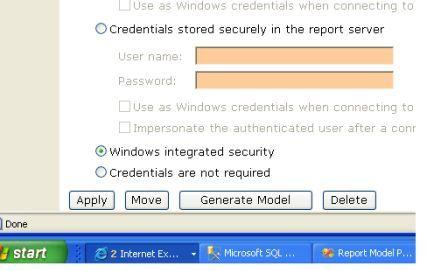
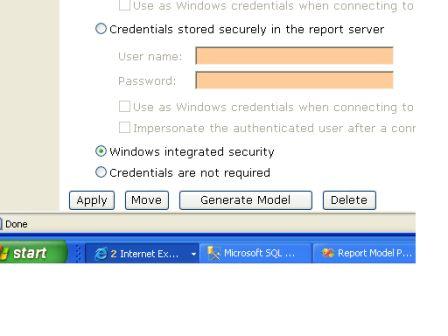
... or in IE through Report Manager. Go to the properties of a data source and you will find the Generate Model button at the bottom of the screen.


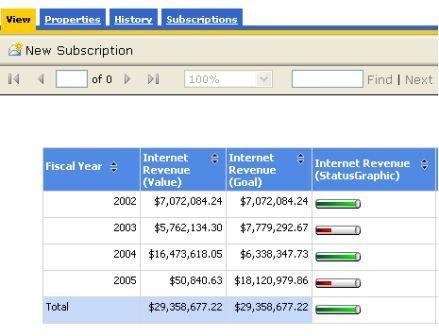
The resultant SSAS report model contains structures based on dimensional relationships to measure groups as well as perspectives defined in the source cube. Even KPIs (and access to their display images) are included in the model. One thing that we do not get, however, are structures which mimic the attribute hierarchies. Nonetheless the attributes that make up the hierarchies are all there.


Does the newly generated model interrogate the OLAP cube on which it was based, not just simply back to the original base DSV? A quick Profiler trace while using the model in Report Builder proves that MDX is being generated and sent to the Analysis Server - no relational queries.

If the cube structure ever changes on the server just hit the "Regenerate Model" button on the properties page of the model in Report Manager or "Update Model" in Management Studio. This will bring the model back into synch.